Oldhammer Exeter

Jamiie

Serf
Hi Everyone

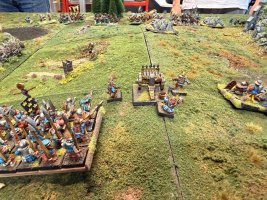
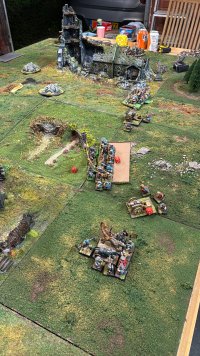
It's getting closer to Garragehammer season. I had to stop early last year because of Real Life. So I thought this year I would try to get started earlier. The first game of the year in Exeter will be in late April. I will as normal GM and it will be either a WFB 3rd semi skirmish game or a 40k RT or probably as normal a mash up of both.
 

Attachments

  • tempImageKBBoUO.jpg
    tempImageKBBoUO.jpg
    1.9 MB · Views: 10
  • IMG_0601.jpg
    IMG_0601.jpg
    1.5 MB · Views: 10
  • B22DDA0C-E03B-419F-8665-A44E73FD6024.jpg
    B22DDA0C-E03B-419F-8665-A44E73FD6024.jpg
    1.3 MB · Views: 10
Holiday? You could take in Stone Henge, Avebury, Bath, Castle Combe etc. on the way down. Forest of Dean and The Cotswolds too if you take the scenic route. Bring a raincoat.
 
Last edited:
Looks like loads of fun and great photo of the battles. And whilst I always advocated being prepared, are you sure the cake is going to last to April? ;)
 
but most photos I have are too big for the forum
Pre-process them! We allow up to 3MB images, to be honest for web viewing stuff over about 2000px wide is probably overkill anyhow. For my recent woods picture I did wonder about doing a larger 2000 × 1301 version, but that was 3.2MB since the detail of the trees doesn't compress that well and no one really wants to be pulling down lots of large files. The version I ended up using was 1200 × 781 and 1.3MB. I tend to use ImageOptim to remove some extra cruft and crunch the files down a little more, there are other similar tools for other platforms. If you're a Windows lad MS have a batch resizing tool if you don't have anything shinier. I switched back to Serif (Affinity suite) tools a while back myself, although less than pleased they were then acquired by Canva and it's now "free" (which everyone assumes means subscription in years to come, alas flat licence is one reason I went to them over Adobe and because much as GIMP is lovely I've never found it that easy). Anyhow I digress.

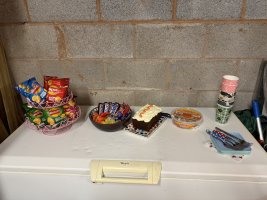
Back to the gaming ... thought for a moment you'd put half a dozen grapes in with the sweets then looked again and realised it was lemon sherbets! I guess the carrot cake counts as vegetables? ;)
 
A note to that - I see you are coming via Tapatalk (which I did add for 2-3 legacy users) - you can run the forum quite successfully directly on any modern-ish smartphone (either just in the browser or as a progressive web app fullscreen) and you'll have the advantage of of not having Tapatalk insert adverts and monetise it!
 
Pre-process them! We allow up to 3MB images, to be honest for web viewing stuff over about 2000px wide is probably overkill anyhow. For my recent woods picture I did wonder about doing a larger 2000 × 1301 version, but that was 3.2MB since the detail of the trees doesn't compress that well and no one really wants to be pulling down lots of large files. The version I ended up using was 1200 × 781 and 1.3MB. I tend to use ImageOptim to remove some extra cruft and crunch the files down a little more, there are other similar tools for other platforms. If you're a Windows lad MS have a batch resizing tool if you don't have anything shinier. I switched back to Serif (Affinity suite) tools a while back myself, although less than pleased they were then acquired by Canva and it's now "free" (which everyone assumes means subscription in years to come, alas flat licence is one reason I went to them over Adobe and because much as GIMP is lovely I've never found it that easy). Anyhow I digress.

Back to the gaming ... thought for a moment you'd put half a dozen grapes in with the sweets then looked again and realised it was lemon sherbets! I guess the carrot cake counts as vegetables? ;)

Windows image viewer let's you resize. As does MS paint. Plenty of free tools. And of course not using pngs is a win.
I generally aim for about 250 to 500kb for a normal image?
 
Pre-process them! We allow up to 3MB images, to be honest for web viewing stuff over about 2000px wide is probably overkill anyhow. For my recent woods picture I did wonder about doing a larger 2000 × 1301 version, but that was 3.2MB since the detail of the trees doesn't compress that well and no one really wants to be pulling down lots of large files. The version I ended up using was 1200 × 781 and 1.3MB. I tend to use ImageOptim to remove some extra cruft and crunch the files down a little more, there are other similar tools for other platforms. If you're a Windows lad MS have a batch resizing tool if you don't have anything shinier. I switched back to Serif (Affinity suite) tools a while back myself, although less than pleased they were then acquired by Canva and it's now "free" (which everyone assumes means subscription in years to come, alas flat licence is one reason I went to them over Adobe and because much as GIMP is lovely I've never found it that easy). Anyhow I digress.

Back to the gaming ... thought for a moment you'd put half a dozen grapes in with the sweets then looked again and realised it was lemon sherbets! I guess the carrot cake counts as vegetables? ;)
I use faststone image resizer. Might not be great but it's pretty good for batch resizing of images based on some requirements (like if you want it based on one side etc). very nice free program.

I won't comment much on GIMP as.. I really hate it.
as for Adobe?... well, My photoshop is photoshop 6. for some reason, internet wants to deny it exists and keep saying "Oh, you mean CS6?" nope.. 6. good enough in 2001, good enough now ^_^
 
I upload my pics to Google photos and then tweak and download them back to my phone before posting them to the forum. They don't look fancy but it's a quick way to get them under 3mb.
 
Back
Top