Better pictures with phone camera?

I've not had much success with a phone camera, I prefer my DSLR, although many swear by them. Distance is important, there'll be an optimum focal length, and lighting is key. A folding photo booth has been a game changer for me. If that's not possible you want at least two light sources, each at about 30 degrees to the front and above the model. They can be softened with a sheet of greaseproof or tracing paper.
 
My phone camera works against me most of the time, but I learned that rotating the phone 180 degrees (basically turning it upside down) and then taking photos from the ground level of the miniature can sometimes make for a more interesting angle.

Can also add that adjusting the brightness by lowering it somewhat before taking the picture makes the colors on the miniatures look more like they do in real life rather than too bright. At least in my experience.

If you got access to some tracing paper you can make a "light box" that could improve the lightning with some lamps. There are plenty of tutorials online for "do it yourself" and/or "make cheap" light boxes.
 
My phone camera takes untrue images, the colours are wrong.
My camera takes more true life colours, but again not as I see them.
My phone screen massively lies about the colours it shows.
My laptop screen is slightly closer to reality.

So between cameras and displays I doubt anything we see online is a true copy of what it actually looks like.
Don't sweat the little things I say.
 
Understanding that tapping the area of focus on the smartphone made all the difference for my crap smart phone photography. It doesn't always work.

My other camera is made out of bakelite (polyoxybenzylmethylenglycolanhydride). I did not retain the dark room equipment required to use it. Probably useless for miniature photography too.
 
I do tend to only use my phone for my quick work in progress shots, although the camera seems quite reasonable. Taking your photo as an example I'd be doing that shot with the model on a plinth of some sort to get it to comfortable height where I could have the phone resting on the tabletop - so nice and stable. I might pop a sheet of white paper on the table under the plinth to bounce some light up to soften a few of the dark shadows since most of your light is coming from above. If you've got a spare lamp then use that as Fimm says to throw some more light on the model from off to one side slightly.

If you want to go a bit more "in" on stuff, there are plenty of little camera lights around these days for £10-30 that will let you adjust both the intensity and the colour temperature of the light so you can add some "fill" light that matches your ambient light in the room, be that daylight or whatever ceiling lights/lamps you have. Also plenty of cheap little tripods you can mount them on. A booth as Fiimm mentions is another good option - that'll soften the light and bounce a bit more light around, I sometimes do my minis in my booth.

For my own photos I use a couple of lights to get an even-ish illumination, typically one either side and one above. I tend to pop the model up on some terrain and have that terrain slightly elevated. I'll use some of the background books from http://handiwork.games for my backdrop if I'm not using something abstract. Then I do the shots with a 180mm macro lens with my camera tripod mounted and with a remote release, angle is slightly looking down on the miniature. Typically the aperture is up at 16-23 to get a good depth of field and since we're all stable a couple of seconds of exposure is fine. Since I have a DSLR I can check the image histogram and zoom in for focus check before I dismantle my little setup. I often slightly underexpose the actual photo and adjust it up a little from the raw file once the image is on the computer. I might tweak the colour balance a little if I feel it's not representative of the colour or I fluffed up my lighting and then it's crop, shrink, compress, optimise and upload! I'd not bother doing that lot if I'd not had a photography phase and therefore have a lot of kit! Modern decent camera phone is plenty good!

Anyhow play around a bit with some white card as reflectors - you'll be amazed at how much light you can throw around - so say you're taking a photo by a window - you can work parallel to the window and use that daylight to illuminate one half of the model and bounce some light back off some card to illuminate the other half, things like that. Maybe a little lamp then fills in some light from the front just off axis from your phone.
 
"I think people should use the level of technology that best suits the job. Form Follows function. if a shovel is going to die the hole best, then you don't need a backhoe. If a typewriter can do the job or a quill pen, or a computer, use whatever does the job"
Harlan Ellison, 1995 (in Interview)

A smart phone camera on it's own, it's designed to be a high-grade camera.. no matter what they say, and they are only getting worse as they are relaying on more 'image correction' tools. Many good grade ones are good enough (mine is a cheap good enough for what I use it for and I didn't even buy it cause I have never brought a mobile phone in my life and not really any good for photos of things like minis cause it's way too soft) but you can't beat a decent tool which was MADE for that reason.
 
I think there are a couple of simple things that can help. As others have suggested, good lighting makes a big difference. There's several ways to do that, of course, depending on what effect you want to achieve. Hard lighting can be more dramatic and soft lighting can be more dreamy. Hard lighting is preferred in theatre and to an extent film. Soft lighting is more common in advertising and historically television. Multiple sources helps considerably. Ideally at least one is relatively close to the camera to provide fill. (I usually put mine slightly to the right and just a bit above the camera, but left can work as well.) A good overhead light can provide some striking shadows, but you don't want the shadows to completely overpower the details of your miniature. I have some pretty bright fluorescent shop lights above my gaming table and usually use them as the overhead. I'll add fill with some clip lights. I find both to be a happy medium on the soft/hard spectrum. Fluorescent tubes are pretty soft, but give good shadow below. The clip light next to the camera can warm the image up considerably and brighten the shadows up so you don't lose all the detail in them, but if the distance is right you won't lose them entirely. If you want a little softer fill you can bounce a bright light off a ceiling or wall. If you point it away from your subject and it's sufficiently bright the reflected light will be surprisingly soft. For a softer studio look without investing in a lot of equipment you can take a large sheet of stiff white or light colored paper bend it into a gentle curve. Place your subject on it in front of the curve. Use a bright light source reflected off the wall or ceiling, but not lighting the miniature directly. And again, use your smaller light source closely adjacent to the camera to fill in deep shadows.

I've found a typical smart phone camera works fairly well, since it usually has a lens with a relatively short focal length and a pretty wide field of view, and honestly, the resolution is pretty comparable to any but fairly high end SLRs these days. (Better than my own twenty year old SLR, though I still use the "real" camera when I want a longer lens.) It does help to have good software where you can change the focus and other settings manually. Depending on what phone you have there might be alternative software that's better than whatever came with it. And of course you can adjust color, crop, exposure, and add quite a few effects with software like Picasa or GIMP, both of which are free. (Picasa is out of support, but I believe you can still find it, and it's a very simple, quick and dirty editing tool. Very easy to learn and surprisingly powerful for how simple and fast it is.)

Anyway, it can be pretty rewarding. Play around. Have fun.
 
i struggled with this for far too long. Was using one of those cheap plastic cameras, the ones that eat batteries. My wifes " smart phone" really didn't do any better. I would take 100 pics and throw 90 away, it was horrible.
Here's the best thing about smart phones IMHO, they dropped the cost of real cameras down to nothing.
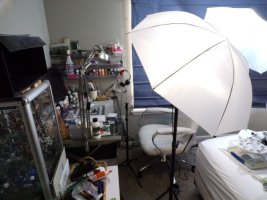
I bought a brand new in box Kodak Pixpro AZ421 for $50 US dollars. best investment ever, it's not a fancy camera but it changed the game for me. Then for about $60. US a set of studio lights with camera tri-pod. I set the camera for macro focus, the exposure to spot (this is how i control exposure by either putting the target on a bright or dark spot), and set for 2 second delay to avoid shake from button push. It was the best investment i made as the picture taking was starting to really sour my enjoyment of the hobby.
Here's my simple little thing i throw together, shooting onto either a scenery backdrop or straight Gray poster-board. Could use a better space
but........
lights (2).JPG
 
LOL, Almost never rains here, Colorado is a high Desert.
The best thing about those umbrellas is the light is diffuse. You can get very accurate colors, excellent contrast and depth of field, and it won't blow out your whites or create hot spots. it makes the camera's job easier so to speak.

Another bonus is you can tweak your color balance by having a set of bulbs that either go to the cool side, whit'ish blues.
or if your taking pics of a Tavern lets say with brightly colored clothing and flesh tones, you can put in some "warm" bulbs that shift toward red.

the umbrellas fold up and the they don't take up much space when not in use. The camera tri-pod came with the lights too. The amount of frustration and wasted time this cheap set spared me is hard to describe
 
Back
Top